Customize
Allows stopping the wheel manually. Max 1 min spin.
Hides the text on the wheel while it's spinning.
Removes the winning entry after each spin.
Yes or No Wheel Decider Spinner: Make Effortless Choices
A Fast and Fun Way to Make Simple Choices
Just like other wheel spinning tools, you can use the other variant—the yes or no wheel decide tool—to make a quick decision on anything. This yes or no decider tool is designed to make your everyday choices more rapid and better without any confusion.
Yes No Wheel Decide: Explained
When you don't know whether you should consider any action and need to make a random decision, you can use Wheel Decide Pro's yes no wheel decide platform for sound choices.
This could be an easy and fun way to let a virtual spinning wheel decider to make any choice for you. It is useful when you are struggling with overthinking or delaying a simple task, when it is only about choosing anyone and going ahead.
The concept of this spin wheel is quite simple. There will be two sections on the wheel i.e., “Yes” and “No”. By simply clicking on the spin button and waiting till the pointer stops on any part, you can make random decisions swiftly.
Efficient Way to Leverage Yes or No Wheel Decide Tool
You can efficiently use this yes or no wheel decide tool anytime by just opening our website and following the simple steps mentioned below:
Step 1: Configure Current Entries
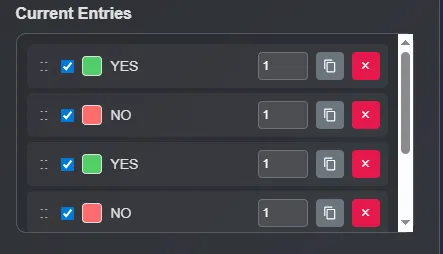
If you do not want to use the same, default entities, you can simply check out the current entries on the right of the spin decider tool. It will be easier to adjust the order of the entries for wheel formation, increase/decrease weights of each entry, copy, as well as remove entries.
Step 2: Add New Entries
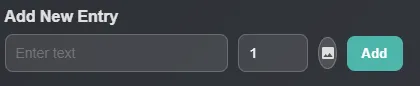
If you want to make more adjustments in the Yes or No wheel by adding new entries, you can look up and find the “Add New Entry” section. Whether it is text or image, you can use any type of entry that suits you best.
Step 3: Customizing Options

 Click on this icon if you want to enable/disable weights of each entry on current entries.
 This icon button will help you lock/unlock all the current entries to ensure proper use of them without any mistakes.
 Upload multiple entries at once and also add weights of each one by adding a comma and a number after the particular entry.
 Use the spin the wheel yes or no wheel decide platform in full screen mode so you don't have any distraction on the screen. Plus, it will be more engaging and convenient to use the tool.
 Delete the current entries of Yes, No, and other custom ones, all at once. This will help reset the platform to use for the next task.
Step 4: View History & Sound Adjustment

Check out the previous history of the yes or no wheel decision tool for better insights on what you did earlier without any hassle. Also, you can adjust the toggle sounds as per your preferences by clicking on the second button.
Step 5: Customizing the Spin Wheel

When you are tired of the same wheel format, you can customize the wheel as per your needs. Just take a look at the tool settings, placed below the spinning wheel section. You can simply select the tool setting to expand the whole section. Here you will be exposed to some customization settings, including:
- Spin Behavior: Adjust the spinning speed and the duration of each wheel spin. Manual stopping, mystery spin, and elimination mode to adjust the spin behavior.
- Effects: The effect section will allow you to customize the sound effect. Disable/enable the shower of confetti. Show/hide number of spin counts. Selection of sound themes as per your preferences.
- Wheel Style: Replace the style of the wheel based on your choice and by changing the color of the wheel.
- Manage Wheels: Save the wheel names and load them based on your preferences. Delete names of wheels that are only taking spaces.
- Share: Share the complete wheel to anyone.
- Background: Switch the color of the background of the whole interface by choosing any color from the color picker.
Step 6: Spin the Wheel

When you are ready for Yes or No wheel spinning, you know what you should do. Just tap on the “Spin” button (in the middle of the wheel) or press “Spin the Wheel” button. Both of the buttons will help you start the spinning process and when it stops, you will get your answer right away.
Spin the Wheel Yes or No Wheel Decide Tool With Wheel Decide Pro
Making routine decisions through the spin the wheel yes or no wheel decide tool can be quite entertaining and can minimize decision making time. We have kept the format of this tool as convenient, simple, and accessible for users like you.
The Yes or No spin wheel can help you be free from the stress of small decisions, adds full elements for the tasks, and allows immediate results with just one spin.
Whether you need to make a decision of yes or no for games like Truth or Dare, lighthearted challenges, or everyday tasks, use Wheel Decide Pro's Yes or No spin wheel for a better, enjoyable experience.