Customize
Allows stopping the wheel manually. Max 1 min spin.
Hides the text on the wheel while it's spinning.
Removes the winning entry after each spin.
Interactive Random Name Picker Spin Wheel
Searching for a fun and fair way to pick random names? Take a look at the Random Name Picker spin wheel tool offered by Wheel Decide Pro, the most preferred site for wheel spin practices.
We have made this tool available for everyone to use for free, without any charges. We believe in helping users with random decision making through a more quick and engaging way.
Explanation: Random Name Picker Spin Wheel
The Random Name Picker Spin Wheel is an online wheel spin tool designed for rapidly and fairly decision making on names. It is used to pick names or entries from the list of participants from the spinning wheel.
Users can use our tool for classroom activities, contests, team assignments, events, and giveaways. With the help of this wheel, you can ensure that the decision is unbiased.
You can simply enter the names in the entries of digital wheel. Then, click on the spin to find any random name from your list and proceed further with the results.
Wheel Decide Pro’s Random Name Picker enhances the overall decision making process, allowing participants to be engaged thoroughly and have fun.
Simple Steps to Follow to Customize and Use the Random Name Picker Wheel
Step 1: Editing Entries
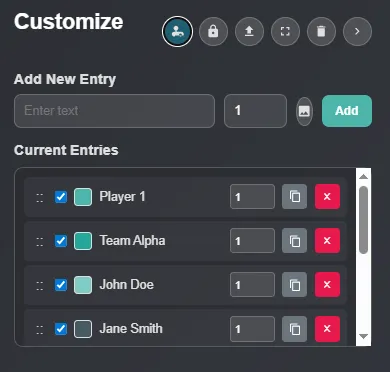
- Add New Entry: The first step is to prepare your entries (names) for the wheel. You can do it by adding new entries.
- Current Entries: Adjust existing entries right before spinning the wheel. Ensure that all entries are in order and have equal weights.
- Customization Options:
 The first customization icon button will allow you to make weight on the current entries enable/disable.
 The lock button icon is used to lock/unlock the whole list of current entries.
 You can import text or image files to the wheel by using this button and then enter the names.
 By simply tapping on this icon button, you will be able to enter full-screen mode, allowing you to spin the wheel easily.
 You will be able to remove all of the current entries of random names at once to start with fresh names.
Step 2: Random Name Wheel Configurations
Click on the “Tool Settings” section to expand the whole wheel configuration setting. In this, you will find various options to customize your random name decider wheel based on your preferences.

Spin Behavior:
You can change the spinning speed and overall spinning duration.
Effects:
Sound on/off, confetti on/off when win, spin count numbers show/hidden, and sound themes can be adjusted through the effects section.
Wheel Style:
Easily change the overall color of the wheel based on your choice.
Manage Wheels:
Update wheel name everytime you decide to spin it. Also, check out the list of the multiple wheel names and removing options.
Share:
Effortless generation of sharing links to share the Random Name wheel with others.
Background:
Change the color of the whole interface (Random Name wheel page).
Step 3: Spin the Wheel
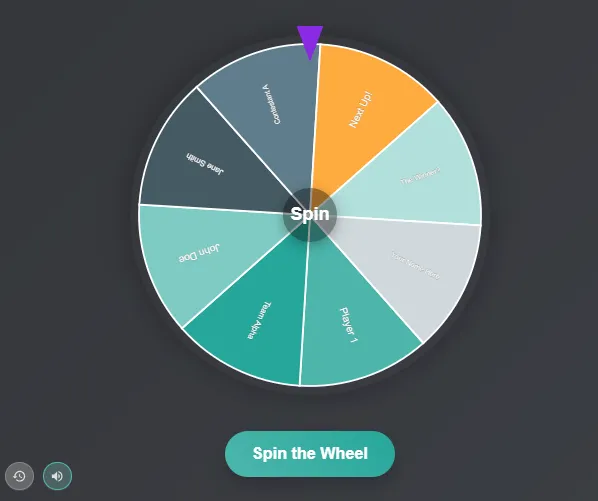
Now, when you are ready with all entries and spin decide wheel configurations, you can simply tap on the “Spin the Wheel” button. Then, the spinning process will begin and the random name stopping on wheel pointer will be the final decision.
 Check out the history of your wheel spins if you need to verify the previous random name decisions.
 Turn on/off the toggle sound by clicking on the icon button.
Using Wheel Decide Pro’s Random Name Picker Tool
Selecting random names for any event, games, participations, giveaways, and contests shouldn’t feel boring. When you caught yourself in between a situation where you need to pick a random name out of many, try our random name picker tool. This simple and easy to use tool will save your time and help make fair decisions. If you need to pick a number instead of a name, check out our Random Number Picker. So, let's just start spinning with our free random name picker tool!